
RTP by TCH for TabaPay Clients
Accept real-time payments on your platform.
TabaPay Clients can use Real-Time Payments (RTP) to send payments real-time, receive payments real-time, and Request for Payments in real-time RfP. While the share is increasing, only select US Routing Numbers are enabled for Real-Time Payments (RTP). Before initiating a payment, TabaPay allows Clients to quickly query if a Routing Number is enabled or not.
Note: Request for payment (RfP) generates a request to the Sender who then initiates a Send Payment request via RTP.
- Enable RTP Send
- Send push payments via the API
Learn more →
Request to enable at TabaPay Support or [email protected].
Use Cases
RTP's Send, Receive, and RfP capabilities allow for instant payments like friends splitting rent, or sending emergency funds, to businesses paying suppliers, and governments disbursing benefits directly to citizens' bank accounts.
Person to Person (P2P)
- Friends splitting monthly rent and utility payments.
- Sending emergency funds to a family member on vacation.
Consumer to Business (C2B)
- Individual paying for services around the house such as the gardener, cleaning services, or childcare provider.
- Day trader sending real-time money transfers to his/her investment account to take advantage of opportunities.
Account to Account (A2A)
- Instantly move funds between different financial institutions.
- Transfer funds between accounts to access earned wages in an emergency
Business to Consumer (B2C)
- Earned & early wage access.
- Business paying employees off cycle.
- Utility company requesting payment for services from a business consumer.
- Retail banking distributing personal loan proceeds to dealership on behalf of customer buying a car at showroom.
- Insurance company adjustor reviewing a claim, providing funds immediately to policy holder after determining the settlement amount.
- Large corporation paying employees for travel expenses in time for payment of corporate credit cards.
Business to Business (B2B)
- Small businesses paying an invoice for goods or services.
- Restaurateur paying a local farmer for fresh produce.
RTP Recipes!
Once you are approved in Sandbox, start testing with RTP examples.
| RTP | Recipes for Integration |
|---|---|
| Send | https://developers.tabapay.com/recipes/8-rtp-push-transaction |
| Request for Payment | https://developers.tabapay.com/recipes/16-rtp-rfp |
| (Receive) | (TabaPay Client's sponsor bank enabled for Receive) Note: For RTP receive, the bank only needs to be enabled for RTP payments. |
RTP Flow
TabaPay enables you to check if the Routing Number of a bank is enabled for RTP. Once you confirm eligibility, proceed to process the RTP transaction using TabaPay's Unified API.
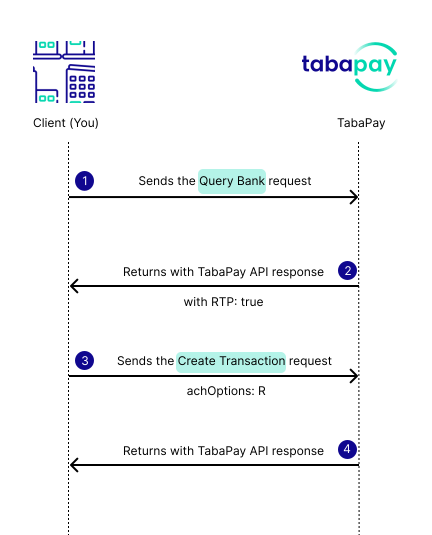
How RTP Works
Prerequisites
1. Query Bank Request
The following recipe shows a request using the routingNumber, and returns with a response of RTP:true
2. Create Account Request
TabaPay strongly encourages Clients to create TabaPay tokens via TabaPay's Create Account API for a bank routing number and account number combination. These created accounts are then used to send funds to or pull from in the next step, i.e. Create Transaction API.
3. Create Transaction Request
This example uses type:push for an RTP Push Transaction. Make sure to include ACH Options of RTP in the Create Transaction API Request.
Requirements from Enabled Bank(s)Your bank(s) that are enabled for RTP may include specific data fields including
name, or merchant name for the RTP bank statement.Note:
pulloptions.expirationDateis required on all RTP RfP (pull) Transactions.
RTP transaction requires the field achOptions with value R for RTP. For descriptions of fields, refer to Create Transaction API.
{
"referenceID": "myUniqueRefID3",
"corresponding": {
    "name": {
        "first": "Ultimate",
        "last": "Debtor"
    }
},
"type": "push",
"accounts": {
    "sourceAccountID": "*redacted*",
    "destinationAccount": {
        "bank": {
            "accountNumber": "111111111",
            "routingNumber": "011001234",
            "accountType": "C"
        },
        "owner": {
            "name": {
                "first": "CreditorFirstName",
                "last": "CreditorLastName"
            }
        }
    }
},
"achOptions": "R",
"amount": "100.00"
}
2. Create Transaction Response
{
  "SC":200,
  "EC":"0",
  "transactionID":"A0oH0E4EiWloxnwr75liQg",
  "networkID":"5BABCD1111111111",
  "network":"RTP",
  "networkRC":"000",
  "status":"COMPLETED"
}
Get Started with some Code Samples!
Learn how RTP works using the TabaPay API.
RTP Reporting
RTP Reporting is sent using the Transactions (Daily) files.
Note: RTP transactions in Transactions (Daily) Reports include Transaction Statuses (e.g. COMPLETED, ERROR, UNKOWN, etc.), but do not include RTP Response Codes.
Updated about 2 months ago