
Real Time Account Updater
Real Time Account Updater (RTAU) retrieves updated card network payment credentials to enable updates in real time. RTAU helps reduce declines caused by expired, replaced, or closed cards. Unlike batch Account Updater services, Real Time Account Updater requests credential updates as part of a Query Card API request, eliminating the delay between requesting updated account information and processing a payment.
By using the most current card information, merchants can reduce payment interruptions, improve authorization rates, and minimize the need to contact customers for updated payment credentials.
Note: This service is only available to TabaPay Clients who are enabled for TabaPay Tokens i.e. store cards with TabaPay.
Request to enable at TabaPay Support or [email protected].
Use Cases
- Subscription Payments: Keep customer payment information up-to-date to reduce the risk of declined transactions due to expired or changed card details.
- Recurring Billing: Maintain accurate billing cycles for regular payments by updating customers' payment credentials to avoid missed payments.
- Installments: Verify that each scheduled payment is processed with the most recent card information, decreasing the likelihood of declined transactions.
Real Time Account Updater Flow
Pre-Requisites
- You must be both enabled at TabaPay and subsequently be registered with the card network for the Real-Time Account Updater service.
- Should know that the RTAU only co-exists when there is no CVV2 or CAVV or TAVV in the transaction. RTAU is intended for Merchant-Initiated Transactions.
- Are required to have an existing, commercial agreement with the cardholder to receive es to their acc updates.
RTAU Flow with Encrypted Token
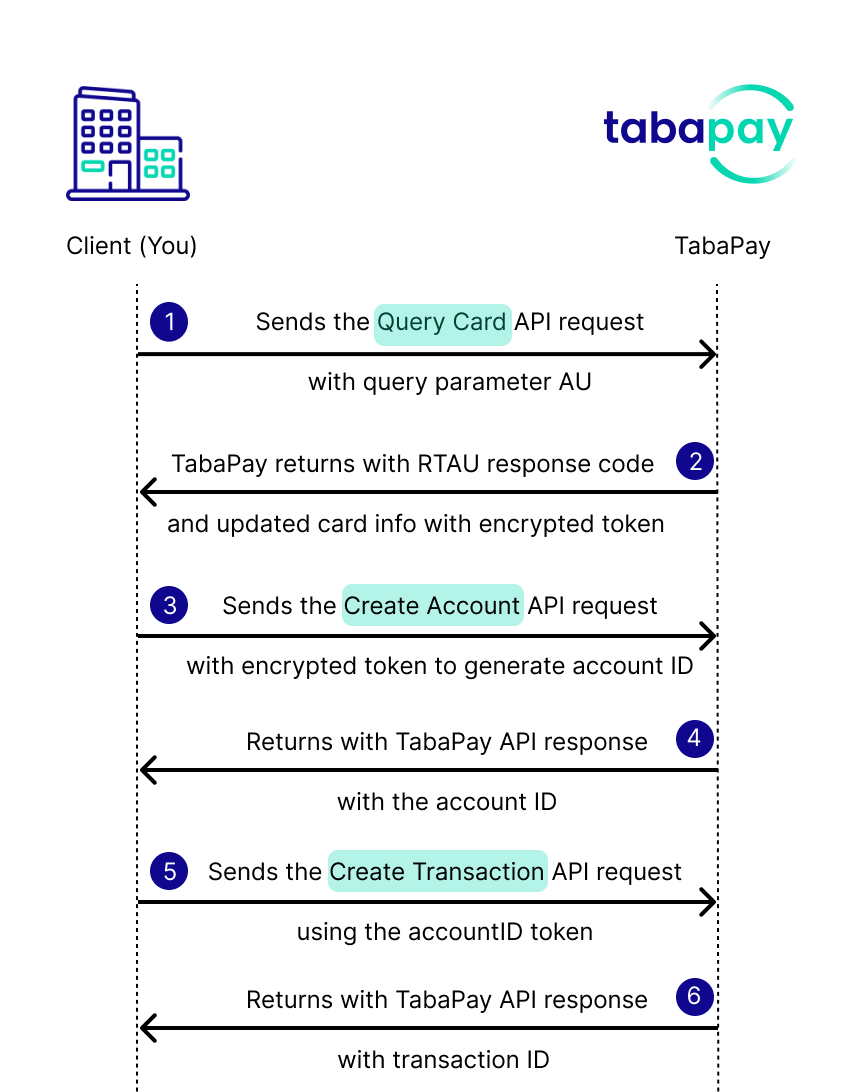
- You send the Query Card API request with an encrypted token (e.g. RSA, iFrame Token, etc.) and the query parameter
AU. - TabaPay returns with the Real Time Account Updater Codes with the updated card information, and encrypted token.
- You send the Create Account API request with the encrypted token to generate an accountID.
- TabaPay returns with the accountID.
- You send the Create Transaction API request using the accountID token.
- TabaPay returns the API response with a transactionID and a success or failure.
RTAU Flow with Account IDs
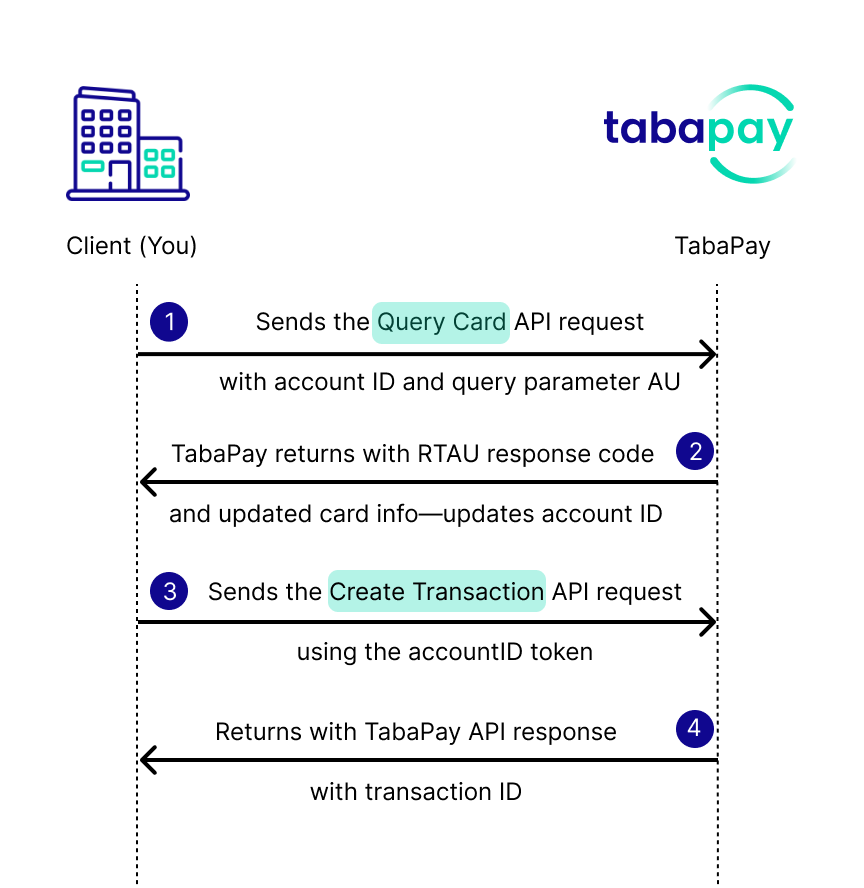
- You send the Query Card API request with query parameter
AU, and the pre-existing accountID. - TabaPay returns with a Real Time Account Updater Code with the updated card information, and updates the card info saved to the accountID.
- You send the Create Transaction API request using the accountID token.
- TabaPay returns the API response with a transactionID and a success or failure.
RTAU Flow with Card in the Clear
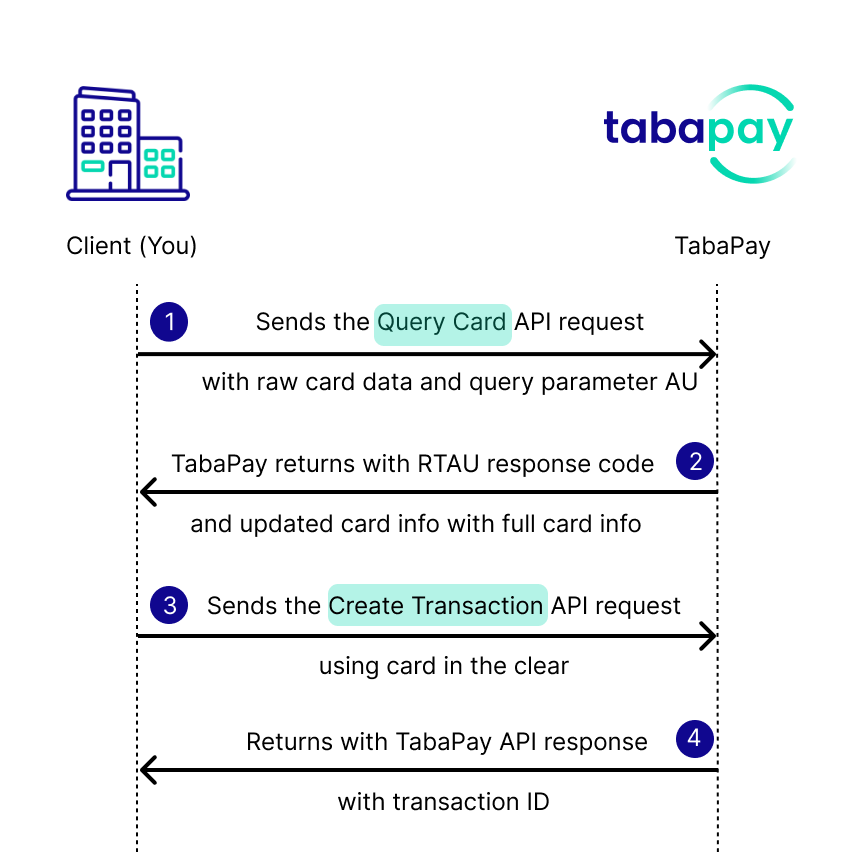
- You send the Query Card API request with query parameter
AU, and raw card information (i.e. card in the clear). - TabaPay returns with a Real Time Account Updater Code with the updated card information, and updates the full card information.
- You send the Create Transaction API request using the new updated card information.
- TabaPay returns the API response with a transactionID and a success or failure.
How RTAU Works
Prerequisites
To request to enable RTAU, contact TabaPay Support, or email [email protected].
General API Prerequisites
If you are using TabaPay Tokens for Source Account information, be sure to grab the accountID originally generated from Create Account.
Clients handling sensitive card data must comply with Payment Card Industry Data Security Standards (PCI-DSS).
Note: All requests should be in a compressed format.
1. Query Card
Include the query parameter AU at the end of the endpoint URL.
https://FQDN/v1/clients/ClientID/cards?AURequest
{
  "card": {
    "keyID": "TabaPay_KeyID_22_chars",
    "data": "Base64_Encoded_Key"
  },
  "owner": {
    "name": {
      "first": "Test",
      "last": "Name"
    },
    "address": {
      "line1": "123 Street",
      "city": "San Francisco",
      "state": "CA",
      "zipcode": "94104"
    }
  }
}
{
"account": {
"accountID": "22CharacterTabaPayID12"
}
}{
"card": {
"accountNumber": "4111111111111111",
"expirationDate": "202708"
},
"owner": {
"name": {
"first": "Test",
"last": "Name"
},
"address": {
"line1": "123 Street",
"city": "San Francisco",
"state": "CA",
"zipcode": "94104",
"country": "840"
}
},
"currency": "840",
"timeout": "39"
}Response
Notice the "AU" object in the Query Card API response.
{
  "SC": 200,
  "EC": "0",
  "card": {
    "bin": "411111",
    "last4": "1111",
    "nameFI": "Financial Institution Name",
    "pull": {
      "enabled": true,
      "network": "Visa",
      "type": "Debit",
      "regulated": true,
      "currency": "840",
      "country": "840"
    },
    "push": {
      "enabled": true,
      "network": "Visa",
      "type": "Debit",
      "regulated": true,
      "currency": "840",
      "country": "840",
      "availability": "Immediate"
    }
  },
  "AU": {
    "reasonCode": "E",
    "card": {
      "token": "80kzS2VZQ0N1a1p3T0h2N2p...base64…Pkq9w==",
      "newBIN": "411111",
      "newLast4": "1111",
      "newExpirationDate": "203012"
    }
  }
}
{
"SC": 200,
"EC": "0",
"card": {
"bin": "411111",
"last4": "1111",
"nameFI": "Financial Institution Name",
"pull": {
"enabled": true,
"network": "Visa",
"type": "Debit",
"regulated": true,
"currency": "840",
"country": "840"
},
"push": {
"enabled": true,
"network": "Visa",
"type": "Debit",
"regulated": true,
"currency": "840",
"country": "840",
"availability": "Immediate"
}
},
"AU": {
"reasonCode": "E",
"card": {
"newBIN": "411111",
"newLast4": "1111",
"newExpirationDate": "203012"
}
}
}{
"SC": 200,
"EC": "0",
"card": {
"bin": "411111",
"last4": "1111",
"nameFI": "Financial Institution Name",
"pull": {
"enabled": true,
"network": "Visa",
"type": "Debit",
"regulated": true,
"currency": "840",
"country": "840"
},
"push": {
"enabled": true,
"network": "Visa",
"type": "Debit",
"regulated": true,
"currency": "840",
"country": "840",
"availability": "Immediate"
}
},
"AU": {
"reasonCode": "E",
"card": {
"accountNumber": "4111111111111111",
"expirationDate": "203012"
}
}
}Real Time Account Updater Response
For Real Time Account Updater Response values refer to Real Time Account Updater Codes.
Recipes
Updated about 1 month ago