
KYB and KYC Verification
KYB (Know Your Business) and KYC (Know Your Customer) are processes used to verify the identity of a business, or personal customer and determine potential risks of illegal intentions for the business relationship. These processes are essential for preventing fraud, money laundering, and financing of terrorism. These processes will greatly impact your platform, customer experience, and any features enabled for a specific user. You will build different workflows for your users based on the specific use case. When a user is verified and clear of any flags, or mismatched information, you may enable more features for them to transact.
Use Cases
- Verify your customers to before they can move funds through your platform.
- Onboard your customers to hold their funds in a wallet or account.
Why Use KYB and KYC?
Implementing KYB and KYC processes is not only a regulatory requirement but also a critical practice for:
- Enhancing customer trust and security.
- Minimizing financial risks and penalties from non-compliance.
- Protecting against identity theft, financial fraud, and other illicit activities.
KYB and KYC Workflow
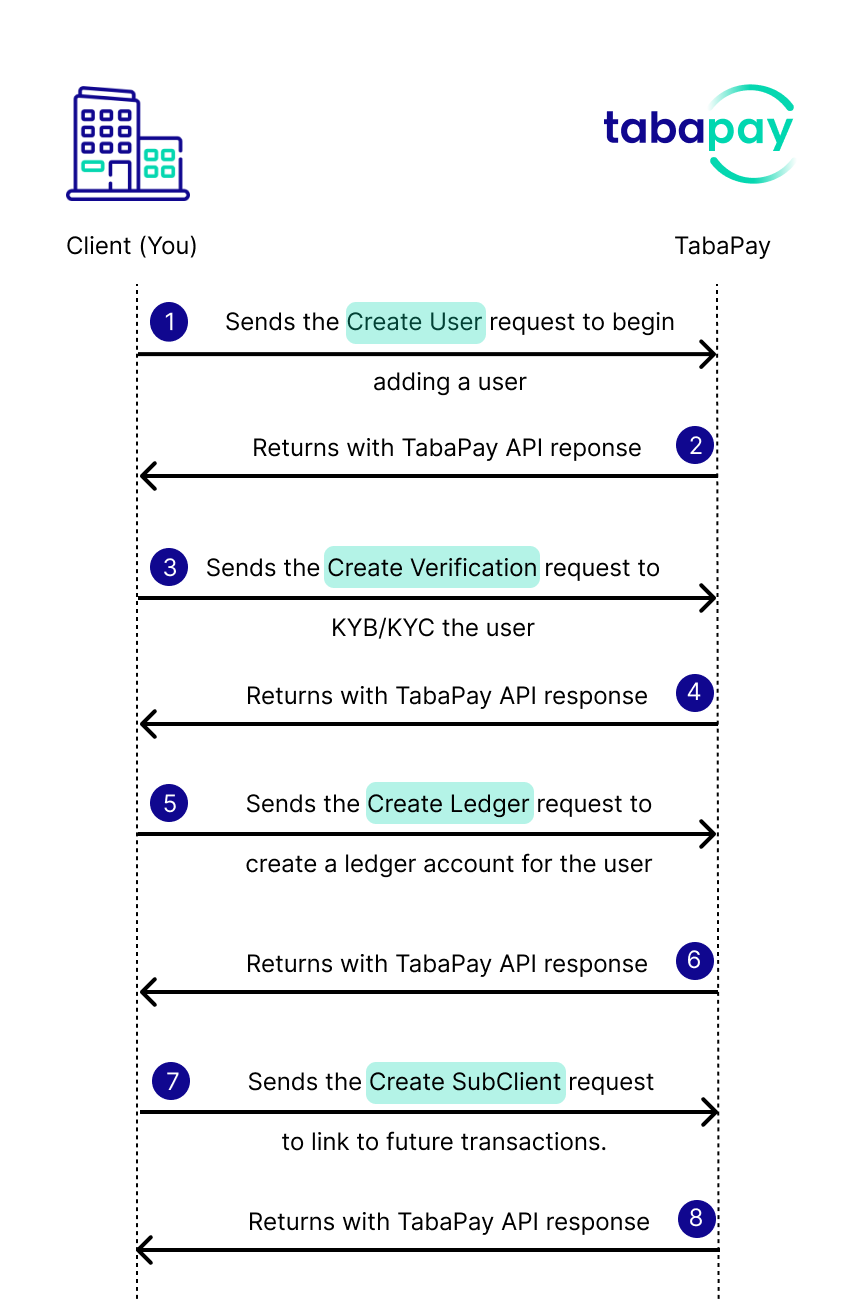
- You send the Create User API request to begin adding a user
- TabaPay returns with an API response
- You call Create Verification API to KYB/KYC the user
- TabaPay returns with an API response
- You send Create Ledger API to create a ledger account for the user
- TabaPay returns with an API response
- You send Create SubClient API request to be able to tie the user to future Transaction API requests.
- TabaPay returns with an API response.
Now you can initiate Create Transaction requests with the endpoint https://{FQDN}:{PORT}/v1/clients/{ClientID}_{SubClientID}/transactions
How KYB & KYC Works
TabaPay introduces a streamlined and efficient KYB/KYC process integrated with APIs, ensuring that clients can effortlessly verify their customers, whether they are individuals or businesses.
1. Create User
Send the Create User API request for the user. For body parameter field descriptions, refer to Create User API request.
Natural Person Request
{
  "referenceID": "1234UniqueRefID",
  "type": "NaturalPerson",
  "name": {
    "individual": {
      "first": "Samwise",
      "middle": "Sam",
      "last": "Gamgee"
    }
  },
  "email": "[email protected]",
  "phone": {
    "countryCode": "1",
    "number": "5555555555"
  },
  "address": {
    "line1": "123 Street",
    "city": "San Francisco",
    "state": "CA",
    "zipcode": "94103",
    "country": "840"
  },
  "dateOfBirth": "19990131",
  "identification": {
    "type": "SSN",
    "number": "243353678"
  }
}
{
    "referenceID": "1kdev05126",
    "type": "LLC",
    "name": {
        "company": {
            "legal": "PaymentsLLC",
            "dba": "Easy Pay"
        }
    },
    "address": {
        "line1": "123 Street",
        "city": "San Francisco",
        "state": "CA",
        "zipcode": "94103"
    },
    "identification": {
        "type": "EIN",
        "number": "243353678"
    },
    "businessOwners": {
        "businessOwner1": {
            "identification": {
                "type": "SSN",
                "number": "243353679"
            },
            "firstName": "Name",
            "lastName": "SirName",
            "dateOfBirth": "19990131"
        },
        "businessOwner2": {
            "identification": {
                "type": "SSN",
                "number": "243353660"
            },
            "firstName": "Name2",
            "lastName": "SurName",
            "dateOfBirth": "19990130"
        }
    },
    "email": "[email protected]",
    "dateOfFormation": "19990131"
}
Response
{
  "SC": 200,
  "EC": "0",
  "userID": "22CharacterTabaPayID12"
}
2. Create Verification
Send the Create Verification API request to collect data from official government documents. After collecting user data, the KYB/KYC process will begin for clients' business or individual user. The Create Verification API response will return the verificationID and the status. Both the verificationID and the referenceID will be able to return any updated status with the Retrieve Verification API request.
Request
{
  "document": {
    "front": "data:image/png;base64,iVBORw0KGgoAAAANSUhEUgAAAAUAAAAFCAYAAACNbyblAAAAdUlEQVR4AQBpAJb/An3cF/+yYWP/+KS7/+A3Gf/UMVD/AolglQDYi1QA2NxGACR2zQDKgFIAAriWcQC6a1oAV3LtAHZjgABTXAcAAsP3OQDCLHYACo6/AGm2rACGrB8AAroJRwDDK68A2K8AAJmwWQBUXlUAAAAA//8E+y4mAAAABklEQVQDAN4HKp4NesEqAAAAAElFTkSuQmCC",
    "back": "data:image/png;base64,iVBORw0KGgoAAAANSUhEUgAAAQAAAAEACAIAAADTED8xAAADMElEQVR4nOzVwQnAIBQFQYXff81RUkQCOyDj1YOPnbXWPmeTRef+/3O/OyBjzh3CD95BfqICMK0CMK0CMK0CMK0CMK0CMK0CMK0CMK0CMK0CMK0CMK0CMK0CMK0CMK0CMK0CMK0CMK0CMK0CMK0CMK0CMK0CMK0CMK0CMK0CMK0CMK0CMK0CMK0CMK0CMK0CMK0CMK0CMK0CMK0CMK0CMK0CMK0CMK0CMK0CMK0CMK0CMK0CMK0CMK0CMK0CMK0CMK0CMK0CMK0CMK0CMK0CMK0CMK0CMK0CMK0CMK0CMK0CMK0CMK0CMK0CMK0CMK0CMK0CMK0CMK0CMK0CMK0CMK0CMK0CMK0CMK0CMK0CMK0CMK0CMK0CMK0CMK0CMK0CMK0CMK0CMK0CMK0CMK0CMK0CMK0CMK0CMK0CMK0CMK0CMK0CMK0CMK0CMK0CMK0CMK0CMK0CMK0CMK0CMK0CMK0CMK0CMK0CMK0CMK0CMK0CMK0CMK0CMK0CMK0CMK0CMK0CMK0CMK0CMK0CMK0CMK0CMK0CMK0CMK0CMK0CMK0CMK0CMK0CMK0CMK0CMK0CMK0CMK0CMK0CMK0CMK0CMK0CMK0CMK0CMK0CMK0CMK0CMK0CMK0CMK0CMK0CMK0CMK0CMK0CMK0CMK0CMK0CMK0CMK0CMK0CMK0CMK0CMK0CMK0CMK0CMK0CMK0CMK0CMK0CMK0CMK0CMK0CMK0CMK0CMK0CMK0CMK0CMK0CMK0CMK0CMK0CMK0CMK0CMK0CMK0CMK0CMK0CMK0CMK0CMK0CMK0CMK0CMK0CMK0CMK0CMK0CMK0CMK0CMK0CMK0CMK0CMK0CMK0CMK0CMK0CMK0CMK0CMK0CMK0CMK0CMK0CMK0CMK0CMK0CMK0CMK0CMK0CMK0CMK0CMK0CMK0CMK0CMK0CMK0CMK0CMK0CMK0CMK0CMK0CMK0CMK0CMK0CMK0CMK0CMK0CMK0CMK0CMK0CMK0CMK0CMK0CMK0CMK0CMK0CMK0CMK0CMK0CMK0CMK0CMK0CMK0CMK0CMK0CMK0CMK0CMK0CMK0CMK0CMK0CMK0CMK0CMK0CMO0TAAD//2Anhf4QtqobAAAAAElFTkSuQmCC"
  },
  "referenceID": "1234reference",
  "userID": "22CharacterTabaPayID12"
}
Response - Created
{
  "SC": 200,
  "EC": "0",
  "verificationID": "22CharacterTabaPayID12",
  "status": "CREATED"
}
3. Retrieve Verification
After initiating a KYB/KYC case, you have two ways to check the status of the case.
Call Retrieve Verification API via verificationID: supply verificationID in the API request to retrieve the case status.
Alternative: Call Retrieve Verification via referenceID: use the referenceID search a case and see the status from the dashboard.
Response - Pending
{
  "SC": 200,
  "EC": "0",
  "verificationID": "22CharacterTabaPayID12",
  "status": "PENDING"
}
Response - Completed
{
  "SC": 200,
  "EC": "0",
  "verificationID": "22CharacterTPVerifyID12",
  "status": "COMPLETED"
}
4. Create Ledger
You can create a ledger to be able to update account balances and limits. Include the previously generated userID from Create User.
Request
{
  "type": "BalanceHolding",
  "referenceID": "1234reference",
  "userID": "22CharacterTabaPayID12",
  "bank": "CRB",
  "currency": "840"
}
Response
{
  "SC": 200,
  "EC": "0",
  "ledgerID": "22characterledgerID123"
}
5. Create SubClient
Create a SubClient to make payments to the accounts of the user. Include the previously generated ledgerID from Create Ledger, and userID from Create User.
Use the endpoint https://{FQDN}:{PORT}/v2/clients/{ClientID}/subclients/{SubClientID}
Request
{
  "type": "NaturalPerson"
  "settlement": {
    "exception": {
      "ledgerID": "22characterledgerID123"
    }
  },
  "userID": "22CharacterTabaPayID12",
  "useCase": "CG",
  "reserveAccount": {
    "ledgerID": "22characterledgerID123"
  }
}
Response
{
  "SC": 200,
  "EC": "0"
}
6. Create Transaction
Use the endpoint https://{FQDN}:{PORT}/v1/clients/{ClientID}_{SubClient}/transactions to send a transaction.
Request
{
  "accounts": {
    "sourceAccount": {
      "owner": {
        "email": "[email protected]"
      }
    }
  },
  "corresponding": {
    "userID": "22CharacterTabaPayID12"
  },
  "correspondingID": "22CharacterTabaPayID11",
  "referenceID": "123reference",
  "amount": "0.25",
  "currency": "840",
  "achOptions": "N",
  "achEntryType": "PPD",
  "memo": "Donations"
}
Response
{
    "SC": 201,
    "EC": "0",
    "transactionID": "Tw8KzsTEUMd4dWhw_bvwXw",
    "network": "ACH",
    "status": "BATCH"
}
FAQs
Yes, however this page represents a different workflow from the general boarding process at TabaPay.
All clients will require their own KYB process when boarding with TabaPay, as well as their own KYC verification if it is applicable.
This process represents boarding sub-merchants, or customers using the User API, Verification API, Ledger API, and SubClient API.
2. Who can use the Verification API? n
Anyone can use the Verification API who is interested in completing the KYB and KYC Workflow with the API requests previously mentioned:
3. Can I use Verification API for boarding sub-merchants?
Yes, if you wanted to adopt a workflow of using APIs to board your sub-merchants, you can use this workflow. Otherwise the typical boarding process, does not include using the APIs.
4. Is there a difference between Create Subclient v4 and Create Subclient v2?
Yes Create SubClient v4 API is for merchants (or sub-merchants) / MID boarding with TabaPay under any ISO (Client).
The new CreateSubCLient v2 API uses the mentioned workflow with User, Verification and Ledger.
Recipes
Updated 5 days ago