
Viewing Chargeback Details
Clicking on any individual chargeback in the chargeback table on the transactions page will take you to a detailed page, providing more information about that specific chargeback.
How to View Transaction Details
- Log in to the TabaPay Portal and select Transactions.
- Select the Chargebacks tab as shown in Transactions.
The Chargebacks table appears with a list of all chargebacks.
Note: To view the Chargebacks tab on the Transactions page, the View Real-Time Transactions switch must be turned OFF.
- Click on the individual chargeback on the chargebacks table.
The Chargeback Details page appears with information about a specific chargeback.
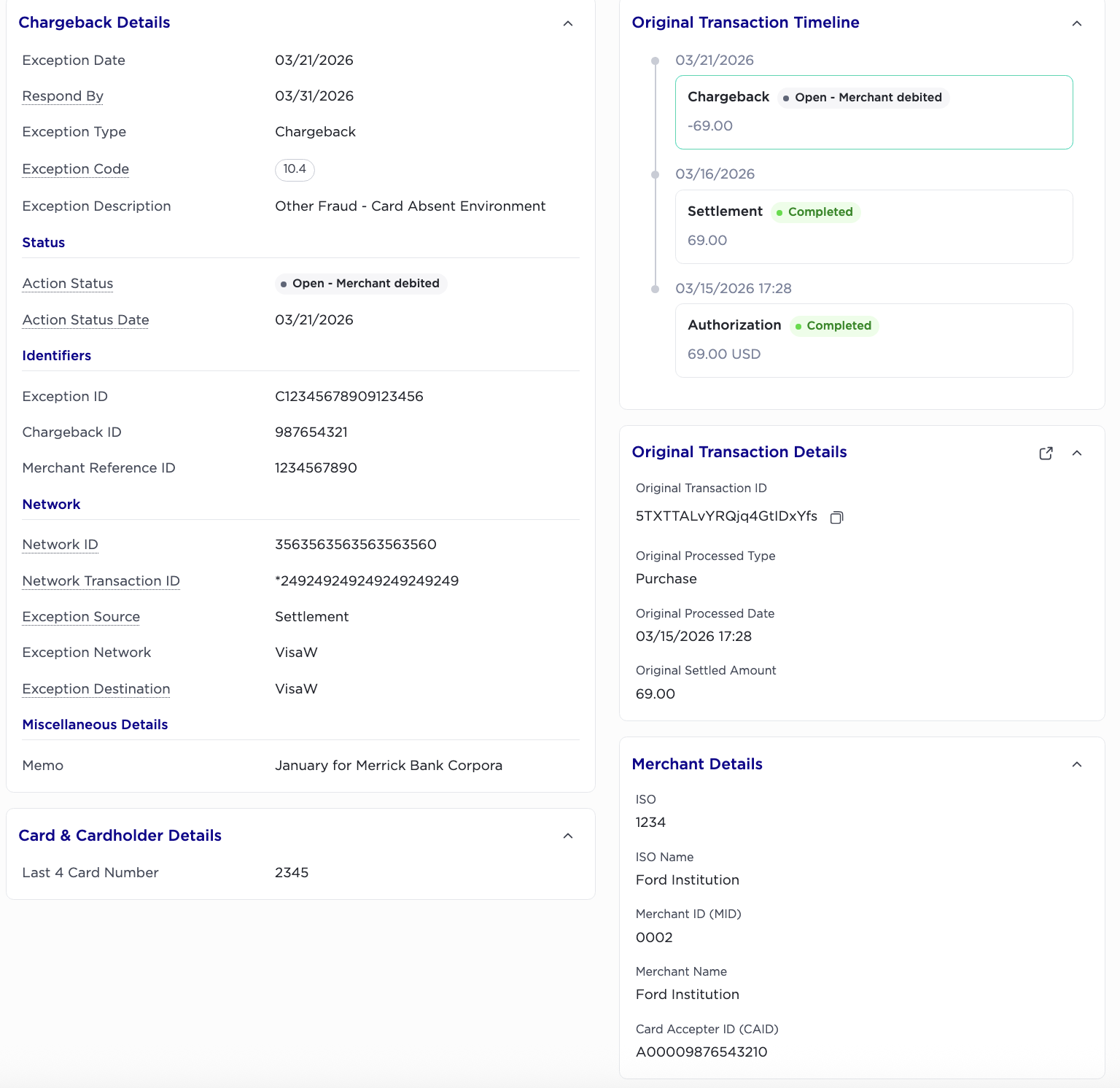
Chargeback Details
1. Exception Date
When the exception code and type was last updated.
2. Respond By Date
The recommended deadline by which the merchant should respond to the chargeback case
3. Exception Type
Category of the exception/adjustment
-
Adjustment - credit
-
Adjustment - debit
-
CHARGEBACK
-
CHARGEBACK REVERSAL
-
REPRESENTMENT
-
Return
4. Exception Code
Network-specific reason code
5. Exception Description
Description corresponding to the network Exception Code
Status
1. Action Status
Current status of the transaction.
2. Status Date
When the status was last updated.
Identifiers
1. Exception ID
Unique reference number generated by TabaPay for each chageback.
2. Chargeback Case ID
Unique reference number generated by the Network.
3. Merchant Reference ID
referenceID sent by the merchant in the Create Transaction API request
Network
1. Original Network ID
Unique character set to every authorization and financial request to a specific network.
2. Network Transaction ID
Acquirer Reference Number (ARN), or and ID assigned to a card transaction by the acquiring bank used to track the transaction through the payment network.
3. Exception Source
If "Exception type" = CHARGEBACK, exception source = Settlement
If "Exception type" = REPRESENTMENT, exception source = the exception network
4. Exception Network
Network card scheme
5. Exception Destination
If "Exception type" = CHARGEBACK, exception destination = the exception network
If "Exception type" = REPRESENTMENT, exception destination = Settlement
Miscellaneous Details
1. Memo
memo passed in the Create Transaction API request
Card & Cardholder Details
1. Last 4 Card Number
Last 4 of beneficiary card (add “0s” in front of number if less than 4 digits
Original Transaction Timeline
1. Disputed Amount
Amount disputed by the customer.
2. Settlement Amount
Amount settled after the purchase.
3. Authorization Amount
Amount authorized at the time of the purchase
Original Transaction Details
1. Original Transaction ID
A unique 22-character identifier representing a created transaction. Generated by TabaPay and present in the Create Transaction response body.
2. Original Processed Type
Purchase
Purchase-Chargeback
3. Original Processed Date
Date/Time (GMT) original Transaction processed at the Networ
4. Original Settled Amount
Original transaction amount settled
Merchant Details
1. ISO
4-Digit ID assigned by TabaPay
2. ISO Name
Name of the ISO
3. MID
Identifies a specific program, or client/merchant with TabaPay under the ISO. This correlates to the SubClientID used in the API.
4. Merchant Name
Name of the merchant
5. Card Acceptor ID (CAID)
A unique identifier assigned to a merchant by their acquiring bank.
Updated about 1 month ago