
ACH Processing and Cut-Off Times
ACH transactions are processed in batches based on the selected processing speed and the time the transaction is received. TabaPay supports Same Day and Next Day ACH processing through the API and batch file exchange.
Use the applicable cut-off time to determine when an ACH transaction enters processing.
ACH Processing Options
For ACH transactions submitted through the Create Transaction API, use achOptions to select the processing speed.
For file-based ACH, specify Same Day or Next Day processing in the applicable ACH Input File.
Cut-Off Times
Submit ACH transactions before the applicable cut-off time to include them in that processing window.
| ACH Submission Method | Same Day | Next Day |
|---|---|---|
| API | 12:00 PM PT | 5:30 PM PT |
| Batch File Exchange | 7:00 AM PT* | 5:30 PM PT |
*Same Day file-based cut-off times may vary by sponsor bank. Refer to your TabaPay configuration for the applicable cut-off time.
Transactions received before the applicable cut-off are included in the corresponding Same Day or Next Day processing window.
ACH Flow
The following ACH diagrams may help represent where the cutt-off time is for an ACH-filed based push transaction flow.
ACH API
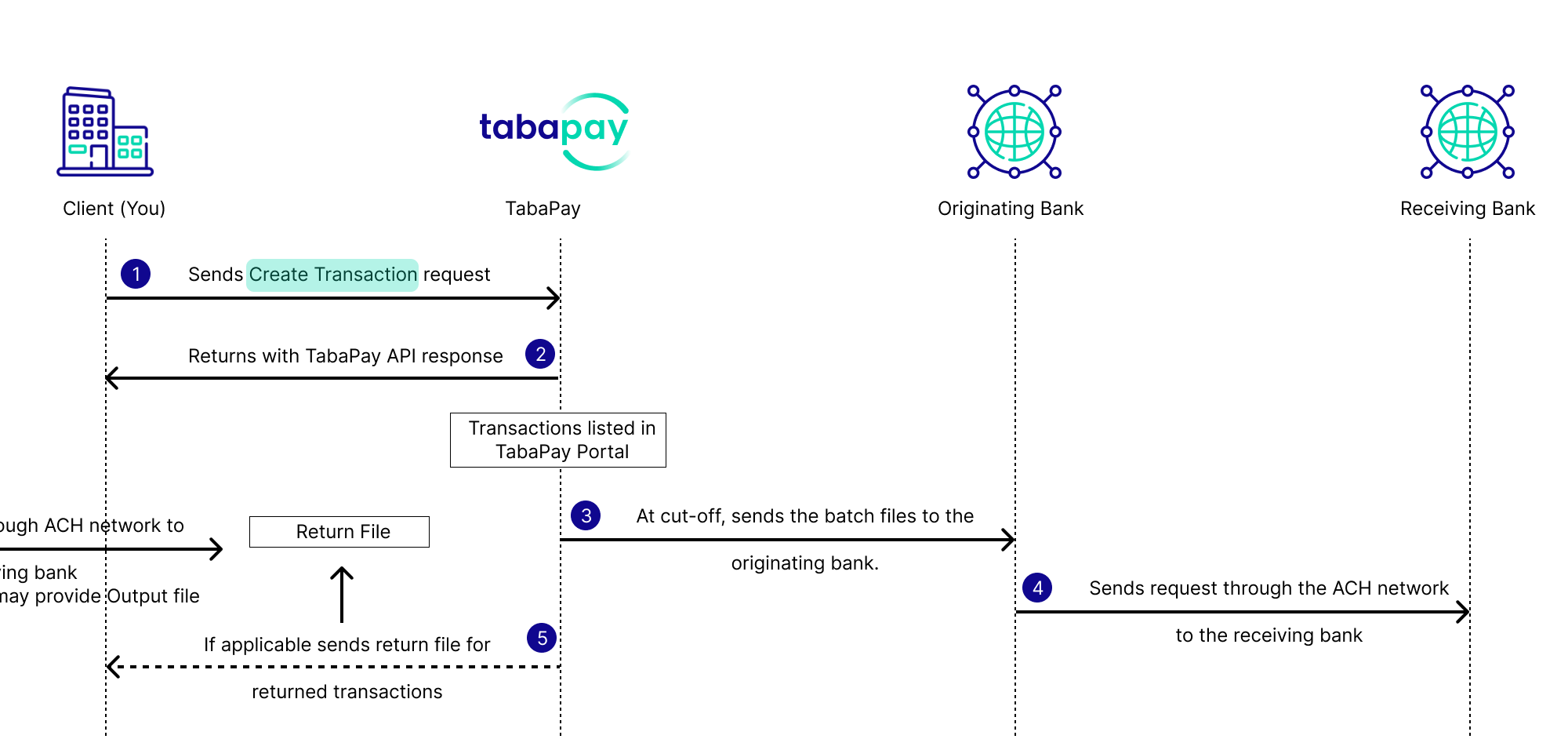
- Submit the Create Transaction API request.
- TabaPay returns API response, and accepts the transaction for the selected processing window. API transactions are displayed in the Transactions table in the TabaPay Portal.
- At the cut-off, TabaPay processes transactions collected since the previous batch, and sends to the originated bank.
- Originated banks send ACH files to the recieving bank
File-Based ACH
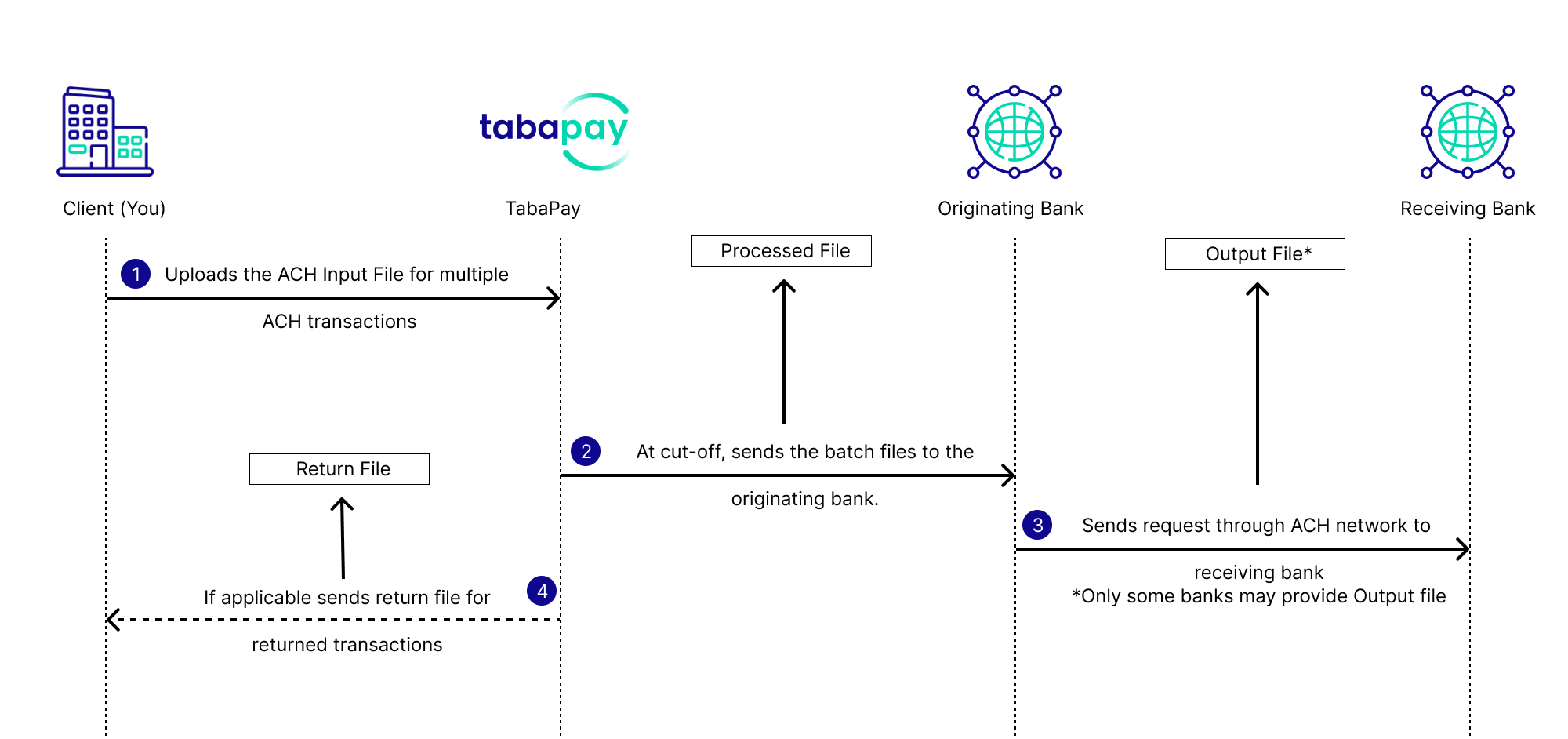
- You upload/send an Input File to the designated folder information.
- TabaPay grabs the file before the applicable cut-off, processes eligible files received by sending off to the originated bank.
TabaPay produces a Processed File. - Originating bank sends file to the recieving bank. Some banks may provide an Output File.
- If applicable TabaPay sends return files for any return transactions through the Exceptions (Daily), or Transactions (Daily) reports.
Transactions Submitted After the Cut-Off
Transactions received after a cut-off are moved to the next available processing window.
For example, a Same Day ACH transaction submitted after the Same Day cut-off does not enter that Same Day batch and is processed in the next available window.
Cut-Off Time Determines ProcessingA successful API response confirms that TabaPay accepted the request. It does not mean the ACH transaction has already been included in a processing batch.
ACH Processing Files
ACH processing generates files that provide additional information about each batch.
| File | Description |
|---|---|
| Input File | Contains ACH transactions you submit to TabaPay. |
| Processed File* | Identifies transactions processed or rejected by TabaPay before sending the file to the originating bank. |
| Output File* | Confirms which transactions the originating bank accepted and sent out for ACH processing. Includes the ACH Trace Number when available. Only some banks may provide the Output file. |
| Return File | Identifies transactions returned through the ACH network. |
*Processed and Output Files are primarily used for file-based ACH. API clients may request these files for specific use cases. API-based ACH does not require an Input File.
The Processed File is not the final ACH transaction outcome. An accepted ACH transaction may still be returned after processing.
For information about transaction states and processing results, refer to ACH Transaction Statuses.
Same Day ACH
Same Day ACH uses an earlier cut-off to process eligible transactions within the same business day.
For API transactions, set:
"achOptions": "S"
Submit the request before 12:00 PM PT for the Same Day API processing window.
For file-based ACH, submit the applicable Input File before the configured 7:00 AM PT Same Day file cut-off.
Next Day ACH
Next Day ACH processes eligible transactions in the next processing cycle.
For API transactions, set:
"achOptions": "N"
The Next Day cut-off is 5:30 PM PT for both API and file-based ACH submissions.
Related Resources
- Send ACH via API: Submit individual ACH transactions with the Create Transaction API.
- ACH via Batch File Exchange: Submit ACH transactions using Input Files.
- ACH Transaction Statuses: Understand transaction and processing statuses.
- Reconcile ACH Transactions: Track transactions across API responses, processing files, reports, and returns.
- Handle ACH Returns: Review and respond to returned ACH transactions.
Updated 8 days ago