
Deactivate and Reactivate Users
Use user lifecycle actions to remove or restore Portal access while preserving the user record for account administration and audit purposes.
Deactivate a User
Ensure the Right Client AccountIf you have multiple ClientIDs you may have different client accounts. To switch to a different client account, click on the desired account name on the top left on the side panel.
- On the left panel under My Organization, select Users.
- To find the user you want to deactivate, use the search bar or filter features as shown in Manage Users.
- Open the user’s Actions menu and select Deactivate User.
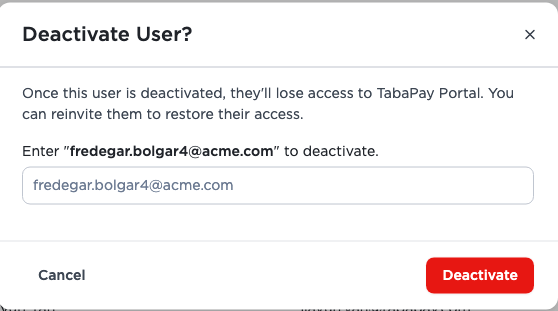
- On the dialogue box type in the user's email address.
- Select Deactivate.
The user’s status changes to Deactivated, and the user cannot sign in until an authorized administrator restores access. Deactivation removes Portal access; it does not delete the user’s data.
Reactivate a Deactivated User
- Open the Users page, as shown in the Deactivate User section.
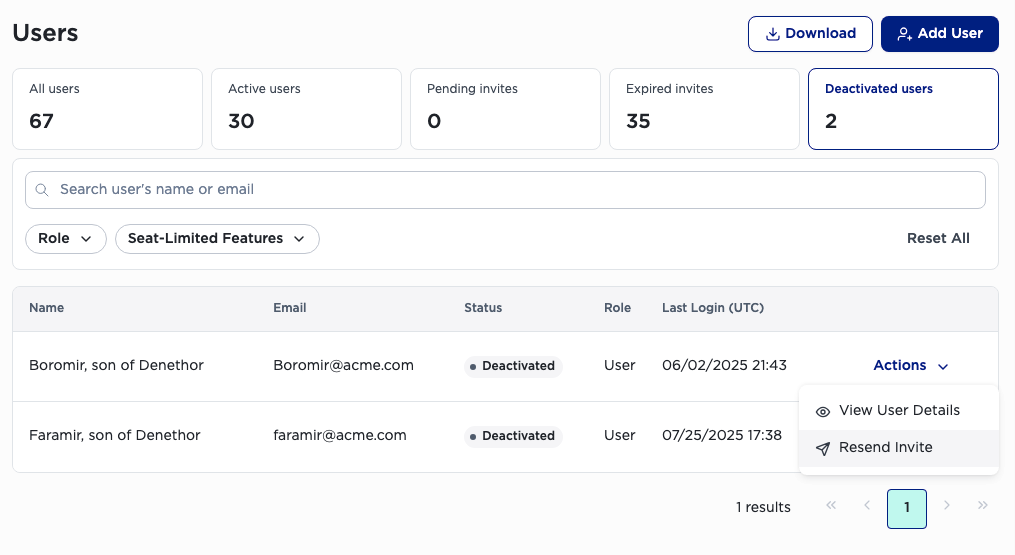
- To find the user you previously deactivated, filter by selecting the Deactivated Users card.
- Open the user’s Actions menu on the right hand side of the user's row.
- Select Resend Invite.
Note: If there is a dialogue prompt after the selecting Resend Invite, you can confirm by following the prompt.
The user receives a new invitation email and can use it to set up access again. The user’s previous role and permissions are restored unless an authorized Admin/Manager changes them.
Resend an invitation
Resend Invite is available for users with Invited, Invite Expired, or Deactivated status when your role allows the action.
- Admins can resend invitations for all three statuses.
- Managers can resend invitations for Invited and Invite Expired users.
- Managers can resend an invitation to a Deactivated User only. Managers cannot resend an invitation to deactivated Admin or Manager.
Role restrictions
- Only Admins and Managers can deactivate Users.
- Only Admins can deactivate other Admins or Managers.
- Managers cannot deactivate Admins.
- Managers cannot reactivate other Admins and Managers.
- The last remaining active Admin cannot be deactivated or downgraded.
Updated 20 days ago