
Visa Alias Directory
Visa Alias Directory links a person's email address, phone number or wallet alias to their payment account. TabaPay uses it to push funds to the recipient's card, using only the alias they share with you.
- Pay with what recipients already share: Senders enter an email address, phone number or wallet alias instead of card details.
- Reach more wallets and banks: Aliases are registered in directories run by Visa and by participating wallets and banks, and TabaPay searches them for you.
- Confirm before you send: Get the recipient's name, and check the last 4 digits of their phone number, before any money moves.
- No card numbers to collect: TabaPay resolves the alias to the recipient's card when you send, so you never collect or store their card number.
Using Visa Alias Directory, you can push funds to a recipient's alias using TabaPay's Unified API. In the API, an alias is sent as a tag. Venmo and PayPal paynames are sent through Visa+ instead.
Use Cases
- Funds Disbursement and payouts: TabaPay Clients can send payouts, such as earnings for gig workers and creators, to a recipient's alias instead of collecting their card details.
- Person-to-Person (P2P) transfers: Senders can pay friends and family using the phone number or email address the recipient shares.
- Gifts: Send money for birthdays, weddings and other occasions.
- Split Bills: Pay a share of rent, utilities, dining out or travel.
Visa Alias Directory Benefits
-
Data Security: No need to capture the recipient's Primary Account Number (PAN).
-
Fewer misdirected payments: Find Tag tells you whether an alias is registered before you send, and Query Tag returns the recipient's name.
-
Superior user experience: It's easier for senders to enter an email address or phone number than a recipient's card details.
Visa Alias Directory Payment Flow
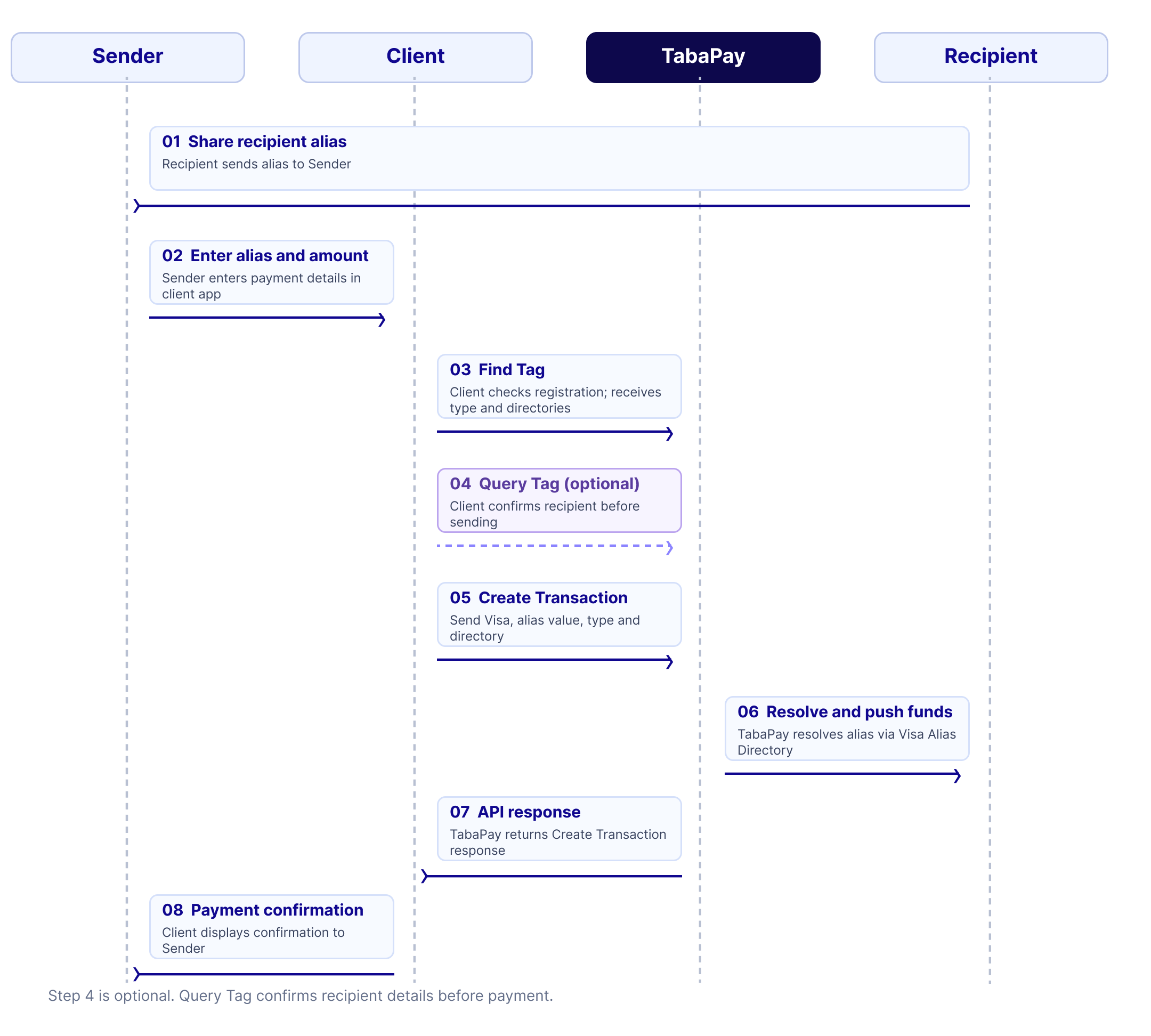
- Recipient shares their alias with the Sender.
- Sender enters the alias and amount in the Client's application.
- Client checks that the alias is registered with Find Tag. The response gives the alias's
typeand thedirectoriesthat hold it. - Optional: Client confirms the recipient with Query Tag. See the confirm process below.
- Client sends the payment with Create Transaction. In
accounts.destinationAccount.tag, sendnetworkVisa, the alias asvalue, thetypefrom Find Tag, and one of thedirectoriesasdirectory. - TabaPay resolves the alias to the recipient's card through Visa Alias Directory and pushes the funds to that card.
- TabaPay responds back to the Client in the Create Transaction API response.
- Client displays the payment confirmation to the Sender.
Find the Alias using Find Tag
Before sending, TabaPay Clients call Find Tag to learn whether an alias is registered, what type it is, and which directories hold it. For more information on fields and descriptions, refer to Find Tag.
Find Tag Request
| Field | Description |
|---|---|
network | Visa |
value | The alias. Don't send its type; Find Tag returns it. |
directory | Optional. Look only in this directory. |
excludedDirectory | Optional. Don't look in this directory. |
userName | Optional. Your ID for the Sender, which Visa uses for risk analysis. Don't send personal information. |
Find Tag Response
| Field | Description |
|---|---|
resolvable | true when the alias is registered, false when it isn't. |
type | The alias's type: EMAIL, PHONE, NATIVE_ALIAS or PAYNAME. |
directories | The directories that hold the alias. Only returned when resolvable is true. |
More than one directory?A recipient can register the same alias in more than one directory, for example a phone number at both a bank and a wallet. Each directory is a different account, so send the one the Sender means to pay as
directory.
Find Tag also works for Venmo and PayPal paynames. Those are sent through Visa+, so they return no directories.
Confirm Recipient (Optional) using Query Tag
TabaPay Clients can optionally get the name registered to an alias, and check that the recipient's phone number ends in the last 4 digits the Sender enters.
When to confirm?TabaPay Clients can then provide this validation to the Sender before completing the payment.
It is up to TabaPay Clients to decide when to prompt Senders to confirm. For example, clients may decide to confirm every time a user sends to an alias for the first time, or when the amount exceeds a limit. If the criteria is met, the Sender can be prompted to confirm the recipient's phone number.
This process is useful for reducing the risk of authorized fraud and incorrectly entered recipient information. Remember: this transaction type is irreversible, and you will not be able to retrieve funds back on fraudulent or incorrectly sent payments.
Confirmation Request in Query Tag API
For more information on fields and descriptions, refer to Query Tag.
| Field | Description |
|---|---|
network | Visa |
value, type and directory | The alias, its type and one of its directories, from Find Tag |
phoneLast4 | Optional. The last 4 digits of the recipient's phone number. |
currency | Required with phoneLast4. The ISO numeric currency code, such as 840 for US dollars. |
userName | Optional. Your ID for the Sender, which Visa uses for risk analysis. |
Confirmation Response in Query Tag API
| Field | Description |
|---|---|
codeConfirmResult | M (match), N (no match) or A (match not performed). A means phoneLast4 wasn't sent, or the directory doesn't check phone numbers. |
name | The recipient's name. Visa may return only the first letter of the last name. |
An alias that isn't registered in the directory returns 404.
Permitted usage of Recipient NameWhen TabaPay Clients receive the recipient's name in the confirmation response, they must treat it with sensitivity.
While names can be stored, they must be treated as “moment in time” data.
Interested in offering Visa Alias Directory to your customers? Contact us: email [email protected] to get started.
Directories
Aliases are registered in directories. Visa runs its own directory, and participating wallets and banks run theirs. Find Tag returns the directories that hold an alias, so you don't need to know them in advance.
Sandbox DirectoriesThe sandbox test aliases are in the
STANDARD_VISAandCash_Appdirectories. See Tag Names for aliases to test with.
Aliases
Aliases are registered by the recipient's bank or wallet. Senders are assumed to know the alias of the recipient they intend to pay.
Alias Types
| Type | Description | Example |
|---|---|---|
PHONE | A phone number: digits including the country code, with or without a leading + | 15551112225 |
EMAIL | An email address | [email protected] |
NATIVE_ALIAS | A wallet's own handle, such as a Cash App cashtag | $simmonsUSpguv6 |
PAYNAME | A payname other than Venmo and PayPal: +name.domain, with one . | +johndoe.banka |
An alias is 3 to 320 characters, with no control characters. A phone number's leading + isn't counted.
Underlying payment instruments
An alias resolves to the recipient's card, and TabaPay pushes the funds to that card. An alias that resolves to a bank account can't be paid.
Best Practices for TabaPay Clients
- Store recipient aliases: Save each alias with its type and directory, so Senders can pick a saved recipient instead of typing the alias again. This helps senders avoid paying the wrong person.
- Request confirmation: Ask the Sender to confirm that the alias is correct and that the name from Query Tag is the person they mean to pay. TabaPay is not responsible for mistyped aliases.
- Transaction notifications: Notify Senders when the payment has been sent to the recipient.
- Send
userName: Send your ID for the Sender on Find Tag and Query Tag. Don't send personal information such as a name, email address or phone number.
Risk Best Practices for Visa Alias Directory
- Velocity Controls: Restrict the number and dollar amount of payments across various time periods, per alias and per user.
- Confirm the recipient: Use Query Tag to check the last 4 digits of the recipient's phone number against what the Sender entered, and decline when the result is
N. Ask the Sender to confirm the alias before proceeding with the payment. - Pre-Authorization Fraud Rules: Risk score and approve or decline the transaction before submitting the payment.
- Account Takeover Controls: Ensure you have two-factor authentication, session monitoring, device intelligence, and/or risk scoring in place.
- Identity Theft Prevention: Use strong identity verification controls, such as selfie checks.
- Customer Education: Add warning messages within your app so Senders know who they're paying.
Updated 1 day ago